Dive Computers Explained: Terminology, NDL, MOD & How They Keep Divers Safe
Dive computers are one of the most advanced and important pieces of scuba diving equipment, helping divers stay within safe limits underwater. Because dive conditions can change quickly, dive computers allow divers to adjust their dive plan in real time based on depth, time, and nitrogen exposure.
For example, a dive plan may be 20 minutes at 15 meters, but strong current may require divers to stay deeper or remain in a sheltered area closer to the sea floor. Unlike traditional dive tables, dive computers continuously recalculate your limits throughout the dive, allowing for flexibility while maintaining safety.
Understanding dive computer terminology helps divers make informed decisions underwater and avoid exceeding safe limits.
What Does a Dive Computer Do?
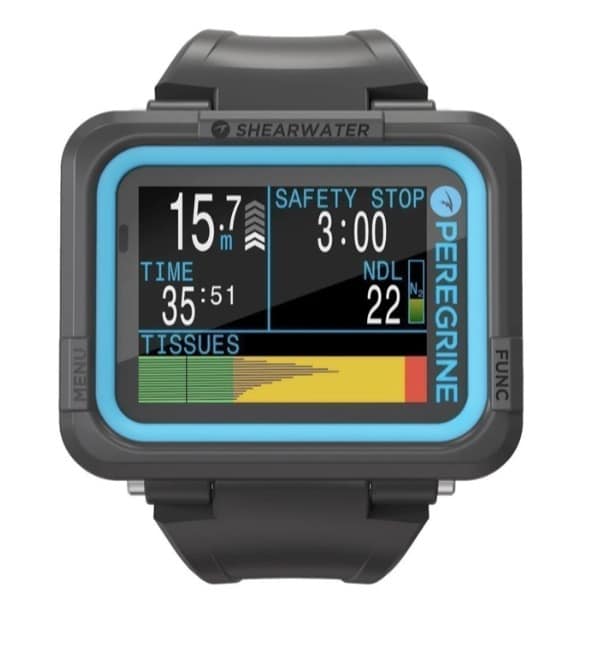
At a minimum, dive computers display:
- Depth
- Dive time
- No Decompression Limit (NDL)
Your dive computer continuously updates these values throughout the dive based on your changing depth profile. This allows divers to make informed decisions if conditions change or if the dive plan needs adjustment.
Dive computers use mathematical models to estimate how nitrogen is absorbed into the body during a dive. While highly effective, these models are not tailored to your exact physiology, so divers should always build in a safety margin.
Why Dive Computers Are Important for Dive Safety
Diving rarely goes exactly according to plan. Factors such as current, visibility, temperature, or navigation changes can impact the depth and duration of your dive.
Dive computers account for these real-time changes and help divers stay within safe exposure limits.
However, a dive computer does not automatically make a dive safe. Divers must still:
- Monitor their depth and time
- Track air consumption
- Stay within training limits
- Plan conservative dive profiles
- Follow safe ascent procedures
Your dive computer is a tool to assist decision-making, not replace proper training and judgment.
Understanding NDL and MOD
Two of the most important dive computer readings are NDL and MOD.
NDL (No Decompression Limit)
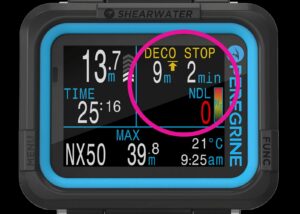
The No Decompression Limit (NDL) tells you how long you can remain at your current depth before mandatory decompression stops are required during ascent.
Recreational divers typically plan dives to remain within no-decompression limits, meaning the NDL remains above zero throughout the dive.
If NDL reaches zero, the dive computer will require decompression stops before surfacing.
Monitoring NDL is essential for safe recreational diving using air.
MOD (Maximum Operating Depth)
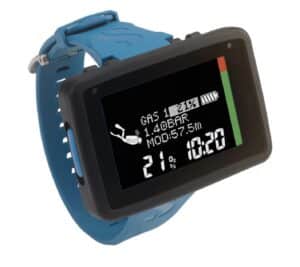
Maximum Operating Depth (MOD) is especially important when diving with enriched air nitrox (EANx).
MOD indicates the deepest depth at which the oxygen content of a breathing gas remains within safe limits. Exceeding MOD can expose divers to unsafe oxygen partial pressure levels.
When diving with mixed gases, depth becomes particularly important to monitor closely.
What Happens If You Exceed Your Limits?
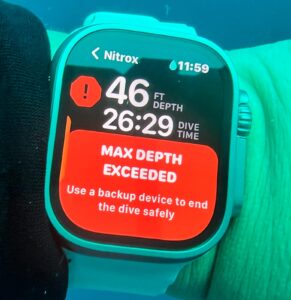
If a diver exceeds NDL or MOD limits, the dive computer will alert the diver, often through audible alarms, flashing indicators, or vibration alerts.
The computer may assign additional decompression stops during ascent to allow excess nitrogen to off-gas safely.
However, the dive computer cannot force a diver to follow these stops. Safe diving depends on responsible decision-making and staying within training limits.
Whenever possible, divers should avoid exceeding planned limits and always allow for contingencies during the dive.
Dive Computers Are Tools — Not Autopilot
While dive computers provide valuable information, divers should avoid becoming overly reliant on them.
It is important to:
- Understand what each reading means
- Know where key information is displayed
- Monitor air supply regularly
- Stay within certification limits
- Dive conservatively
Dive computers can fail, so divers should always be prepared for this possibility.
What to Do if Your Dive Computer Fails Underwater
Although rare, dive computer failure can occur. Divers should be prepared by:
- Diving with a backup computer where possible
- Understanding safe ascent procedures
- Following conservative dive profiles
If your dive computer fails during a dive:
- Ascend slowly to approximately 5 meters / 15 feet
- Complete a safety stop for as long as air supply allows
- Surface slowly and safely
- Follow manufacturer recommendations
- Avoid further dives that day
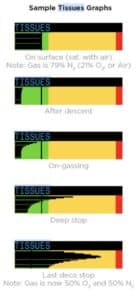
Each dive computer tracks tissue saturation differently, so relying on another diver’s computer is not recommended.
Using your own backup computer ensures the most accurate nitrogen tracking.
Dive Computer Terminology Explained
Understanding common dive computer abbreviations helps divers quickly interpret important safety information underwater.
NDL – No Decompression Limit
Maximum time you can remain at your current depth without requiring decompression stops.
NST – No Stop Time
Alternative term used by some manufacturers for NDL.
ASC – Ascent Rate Warning
Indicates that a diver is ascending too quickly.
Ascending slowly helps reduce decompression stress.
MOD – Maximum Operating Depth
Maximum safe depth for a specific breathing gas, particularly important when diving nitrox.
EANx – Enriched Air Nitrox
Breathing gas with a higher percentage of oxygen than standard air.
Allows longer no-decompression limits at certain depths.
RBT – Remaining Bottom Time
Estimated remaining dive time based on breathing rate and gas supply.
DPT – Depth
Current depth underwater.
Typically displayed in meters or feet.
SURF – Surface Interval
Time spent at the surface between dives.
Surface intervals allow nitrogen levels to decrease before the next dive.
NO FLY TIME / ALT – No Fly Time
Recommended waiting period before flying or travelling to altitude after diving.
Flying too soon after diving can increase decompression sickness risk.
Final Thoughts
Dive computers are an essential part of modern scuba diving, helping divers make informed decisions based on real-time data.
Understanding dive computer terminology allows divers to interpret this information correctly and dive more confidently.
While dive computers significantly improve dive safety, they should always be used alongside proper training, conservative dive planning, and good judgment.
Safe diving comes from knowledge, preparation, and awareness underwater.